
ÁitFoirne
One platform for Irish nursing homes

One platform for your staff, resident care and family connection

ÁitFoirne is nursing home software for Ireland. It brings staff rotas and time, HR and compliance, day-to-day operations, Clinical resident care records and authorised family connection into one platform — with clear access for each role.

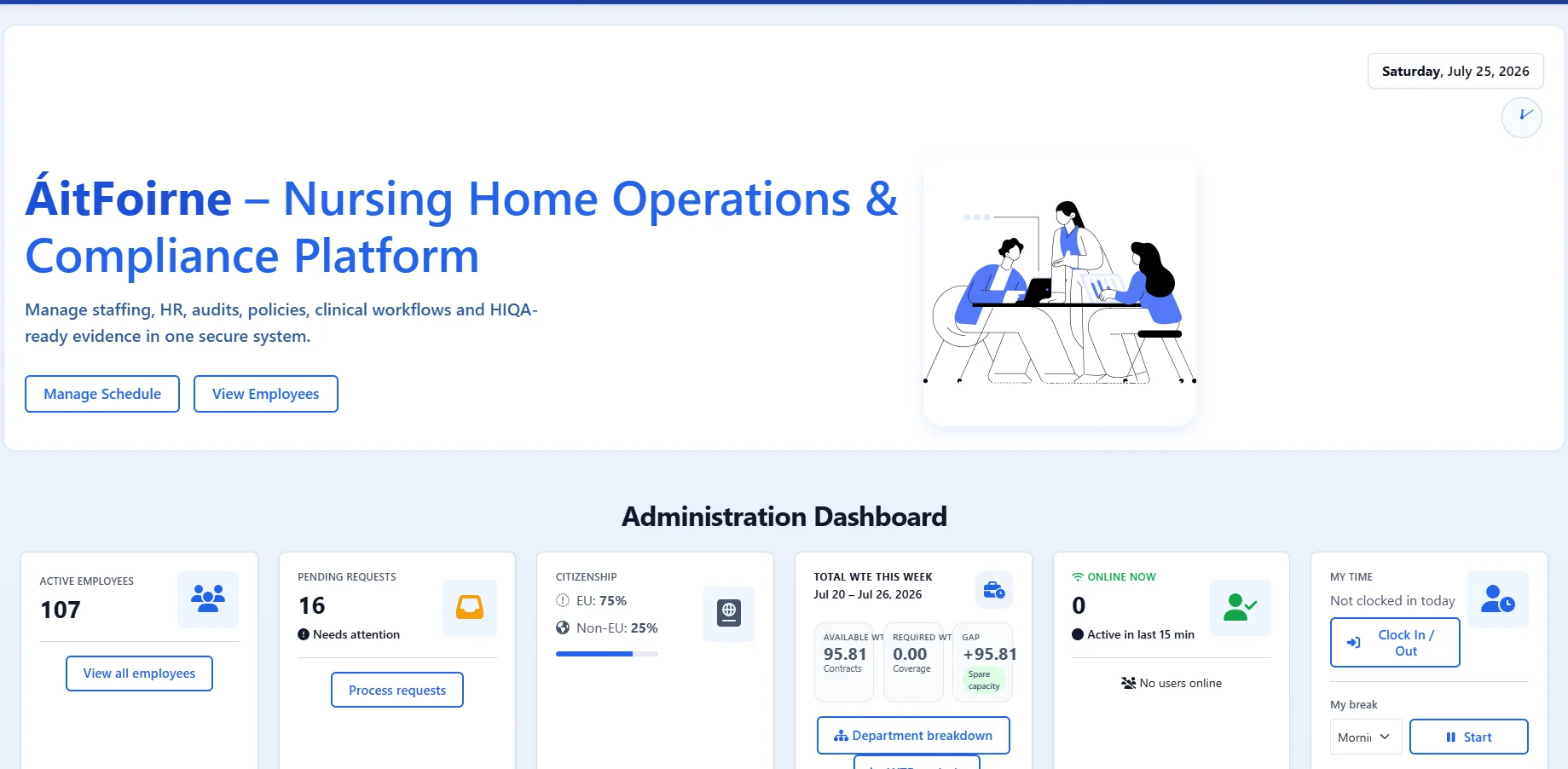
ÁitFoirne Administration Dashboard with summary cards for employees, requests, WTE and time
Workforce & Operations — fictional demonstration data.
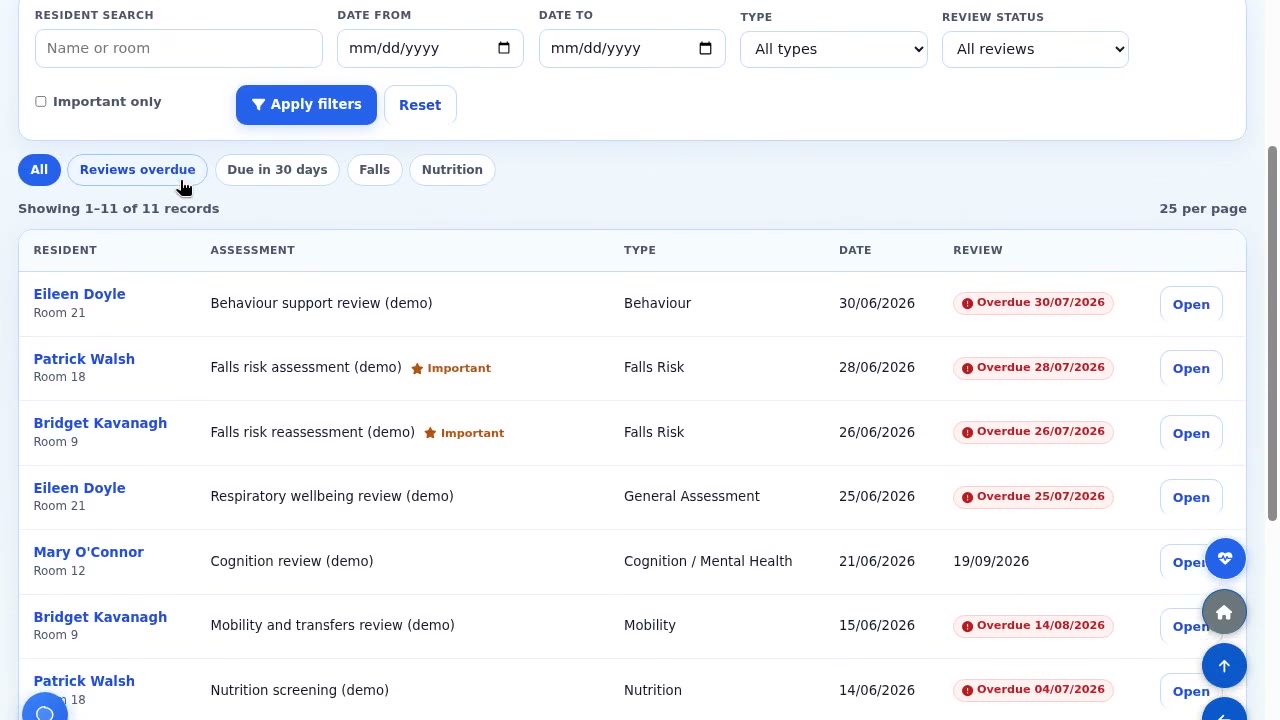
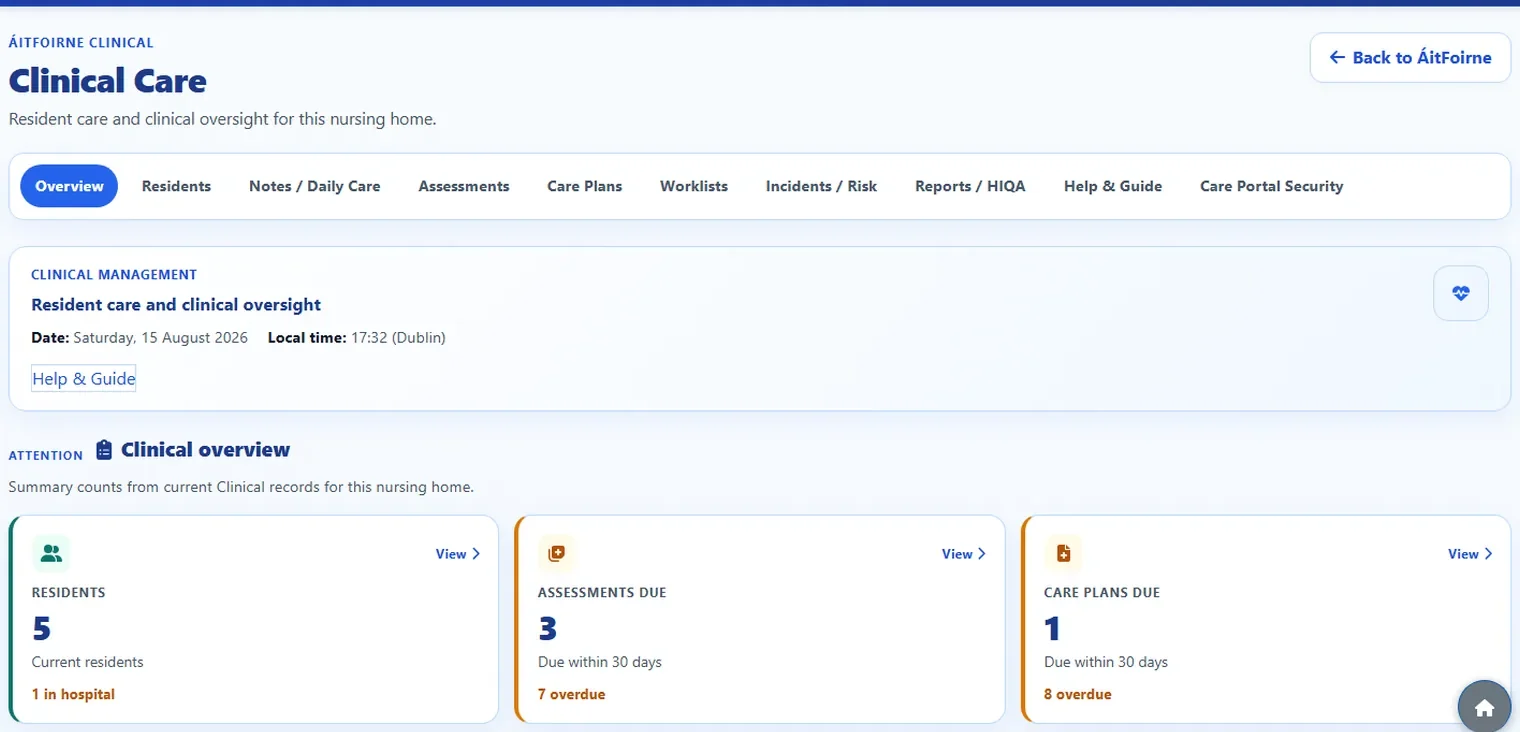
ÁitFoirne Clinical Care overview showing residents, assessments due, care plans due and related clinical work
Clinical — fictional demonstration data.
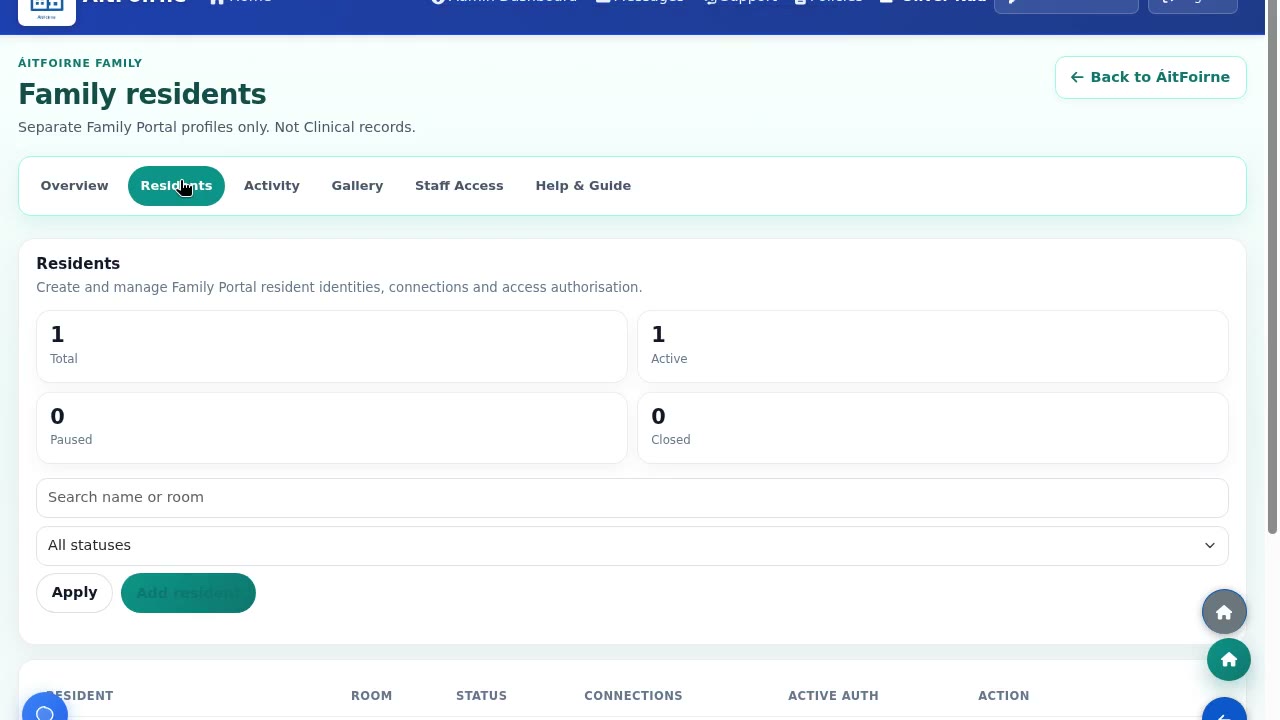
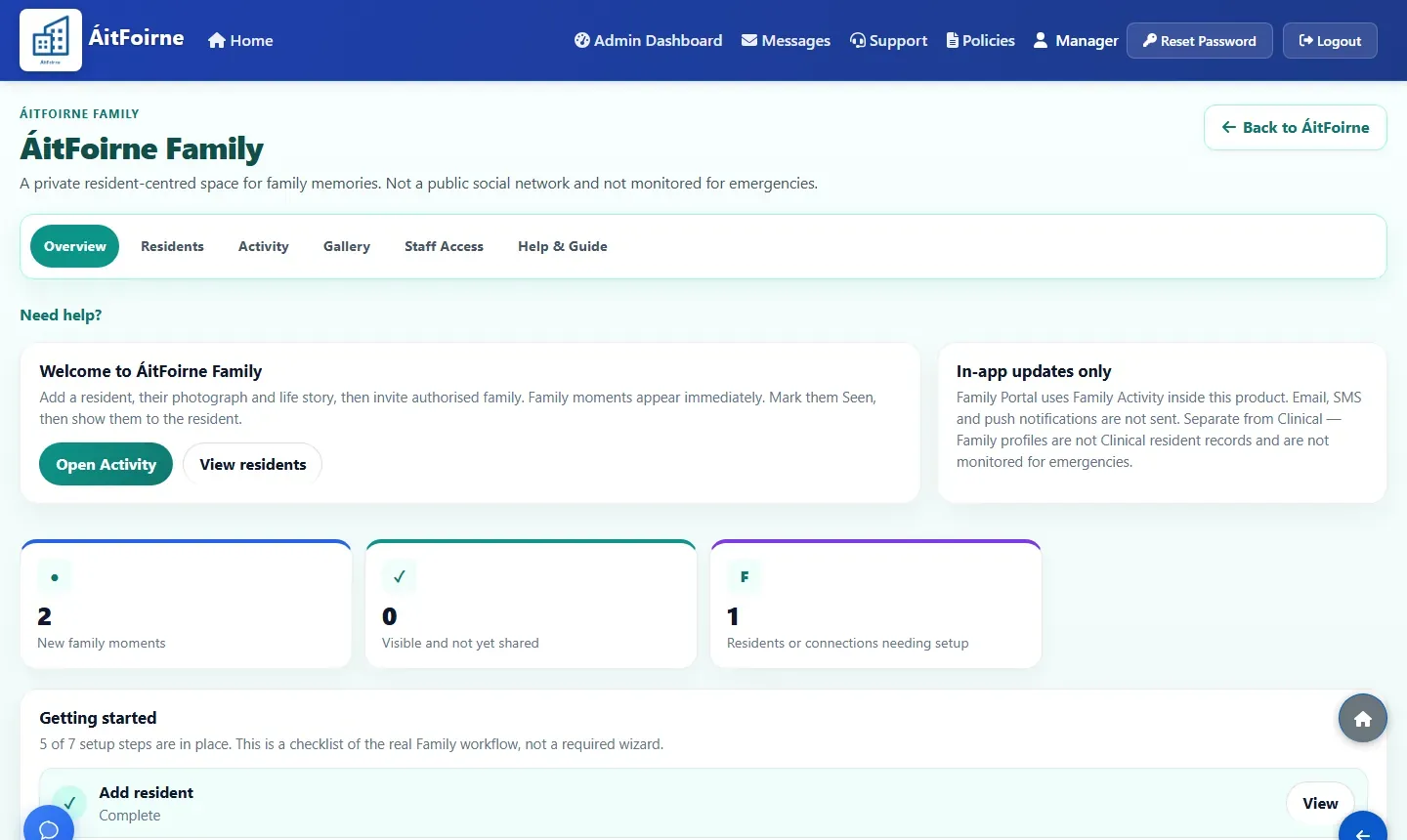
ÁitFoirne Family overview for fictional resident Mary O’Brien, with setup steps and recent family activity
Family Portal — fictional demonstration data.

Used daily by Irish nursing homes

ÁitFoirne supports the day-to-day work of real nursing-home teams in Ireland.

The problem

Too many nursing-home workflows live in different places

When staffing, resident care records and family updates sit in separate tools, managers spend time chasing information instead of running the home.

Rota stored separately

Clocking handled elsewhere

Leave balances kept manually

HR documents spread across folders

Inspection evidence hard to find

One complete platform

Three purpose-built areas for the whole nursing home

Nursing home software with three purpose-built areas: workforce, resident care and authorised family connection — with clear access for every role.

ÁitFoirne

Workforce & Operations

Plan the rota, record time and breaks, approve hours, manage leave, keep HR files in order, and run audits, policies and maintenance from the same staff workspace. Staff use the Employee Portal for their own day.

  • Rotas and scheduling
  • Time, attendance and breaks
  • Approved payroll hours
  • Leave and requests
  • HR and employee records
  • Policies, audits and action plans
  • Maintenance and operations
  • Employee Portal

Access: staff and management, according to their ÁitFoirne role.

ÁitFoirne

Clinical

Keep the resident Clinical workspace together: daily notes, assessments, care plans, observations, risks, incidents, appointments, referrals, documents and tasks. Nurses and Healthcare Assistants record Daily Care in the Care Portal. Authorised managers review Today’s Care and the resident day timeline.

  • Resident Clinical workspace
  • Daily notes and Daily Care
  • Assessments and care plans
  • Observations, risks and incidents
  • Today’s Care and day timeline
  • Care Portal for Nurses and HCAs
  • Inspection-supporting Excel exports

Access: authorised Clinical roles only. A job title does not open Clinical by itself.

See Clinical

ÁitFoirne

Family Portal

A private space for the home and individually authorised family members. Families receive their own personal link and a separate six-digit PIN. They can send messages and up to five photos, see resident-specific care-home posts, and use an optional Family Circle.

  • Authorised family access
  • Personal link and six-digit PIN
  • Messages and photos
  • Care-home posts
  • Shown-to-resident acknowledgement
  • Optional Family Circle
  • Private activity and gallery
  • Access can be rotated or revoked

Access: individually authorised family members only. Family Portal does not show Clinical records or medical updates.

See Family

40+ connected tools

Across Workforce & Operations, Clinical and Family Portal — three purpose-built areas in one ÁitFoirne platform.

  • One connected platform Staffing, resident care and family connection, with clear access for each role
  • Admin, Clinical and Family Different working environments, one provider and one platform
  • Built for Irish nursing homes Designed around real care-home working days
  • Direct ongoing support Practical help shaped by real product use


Inside the platform

Explore the three ÁitFoirne product areas

Choose an area to see what is included. Access stays appropriately separated for staff, Clinical roles and authorised family members.

Staffing, people, compliance and operations

The original ÁitFoirne working day for managers and staff.

Staffing

  • Automatic rota creation
  • Manual rota building
  • Employee time clock
  • Break tracking
  • Approved worked hours
  • Payroll-ready exports

People and HR

  • Request approvals
  • Annual leave balances
  • HR records
  • Employee documents
  • Recruitment
  • Employee Portal

Compliance

  • Audits and action plans
  • Policy acknowledgements
  • Certificate and training tracking
  • Exportable records

Operations

  • Maintenance reporting
  • Workplace communication
  • Internal messages
  • Staff surveys
  • Support requests

Resident care records and Daily Care

A separate Clinical area for authorised nursing-home Clinical roles.

  • Resident Clinical workspace
  • Daily notes
  • Assessments and care plans
  • Observations, risks and incidents
  • Appointments and referrals
  • Documents and follow-up tasks
  • Care Portal Daily Care
  • Today’s Care
  • Resident day timeline
  • Inspection-supporting Excel exports
See how Clinical works

Authorised family connection

A private Family Portal for the home and named family members. It does not show Clinical notes, assessments, care plans or medical updates.

  • Individually authorised access
  • Personal link and six-digit PIN
  • Messages and up to five photos
  • Resident-specific care-home posts
  • Shown-to-resident acknowledgement
  • Optional Family Circle
  • Private in-app activity and gallery
  • Access can be rotated, revoked or reactivated
See how Family Portal works

A connected working day

From the rota to approved hours, requests, policies and audits

Each step feeds the next, so the office is not retyping the same information into spreadsheets, folders and separate tools.

Manager

Prepares and publishes the rota

Plan cover automatically or manually, check gaps, then publish so staff see what is live.

Employee

Sees their shifts in Employee Portal

Published shifts appear on the employee's phone — no printed rota on the wall to check.

Employee

Clocks in, takes breaks, clocks out

Attendance and break time are recorded against the shift as the day happens.

Manager

Reviews attendance and approves worked hours

Nothing is assumed. A manager checks the day and approves the hours that should count.

System

Requests, balances, policies and tasks stay updated

Approved leave, holiday balances, policy acknowledgements and assigned tasks stay with the same staff records.

Office

Reports and evidence are ready when needed

Attendance records and exports are ready for payroll review, and inspection evidence is easier to retrieve.

Rota and staffing

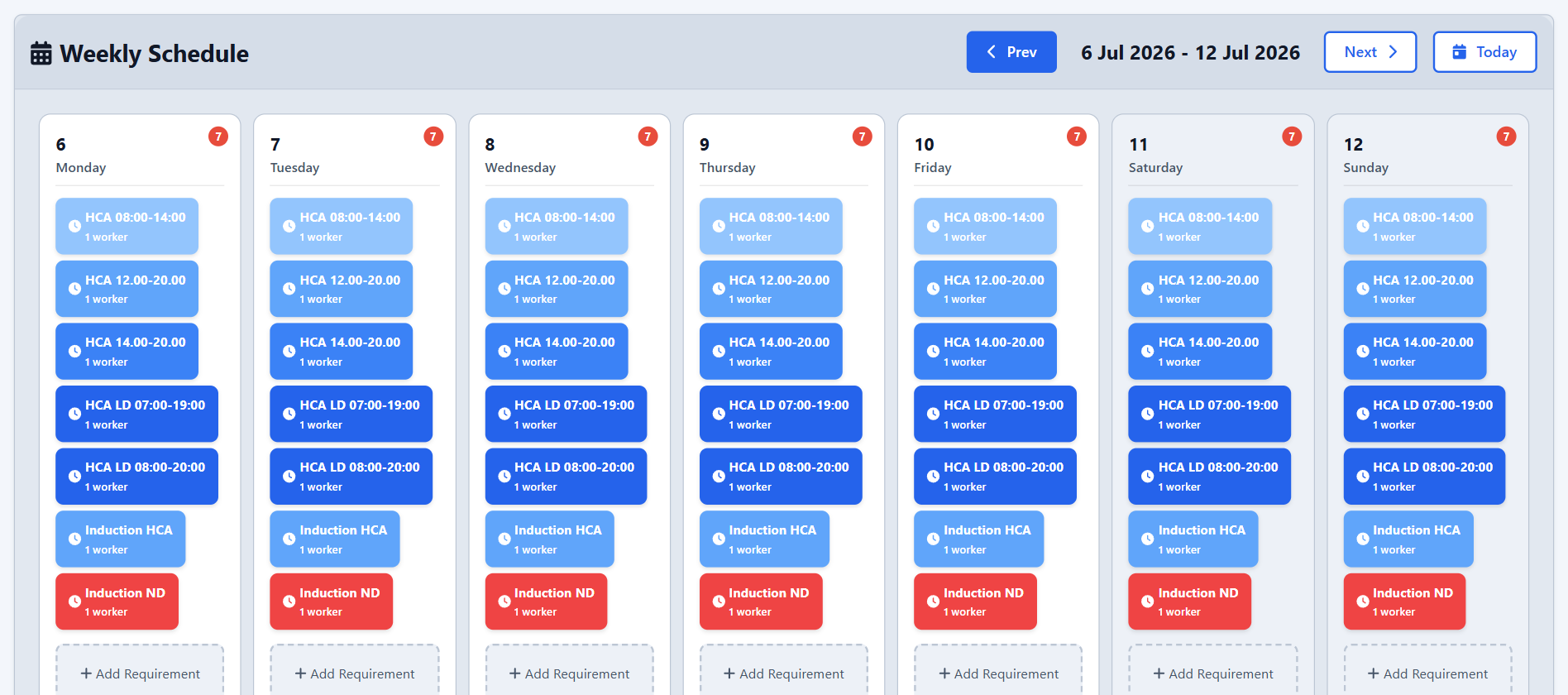
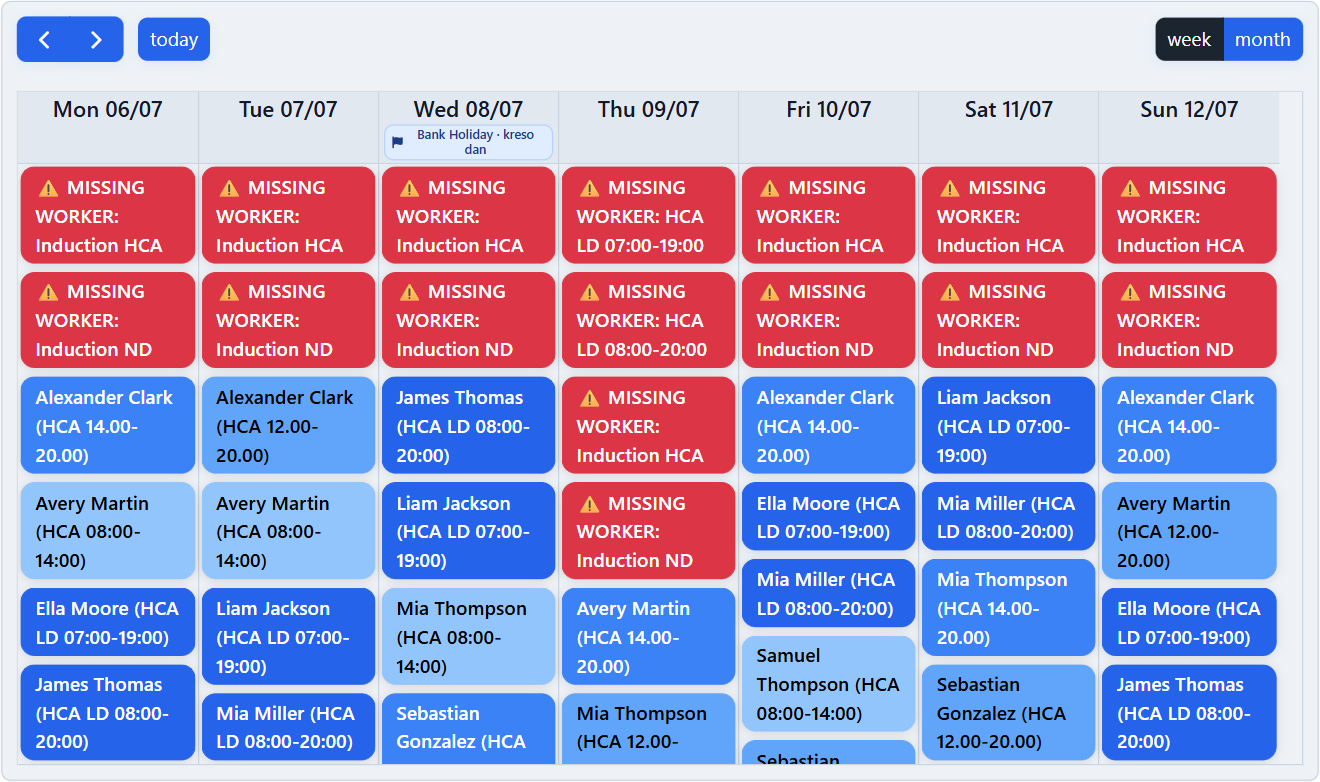
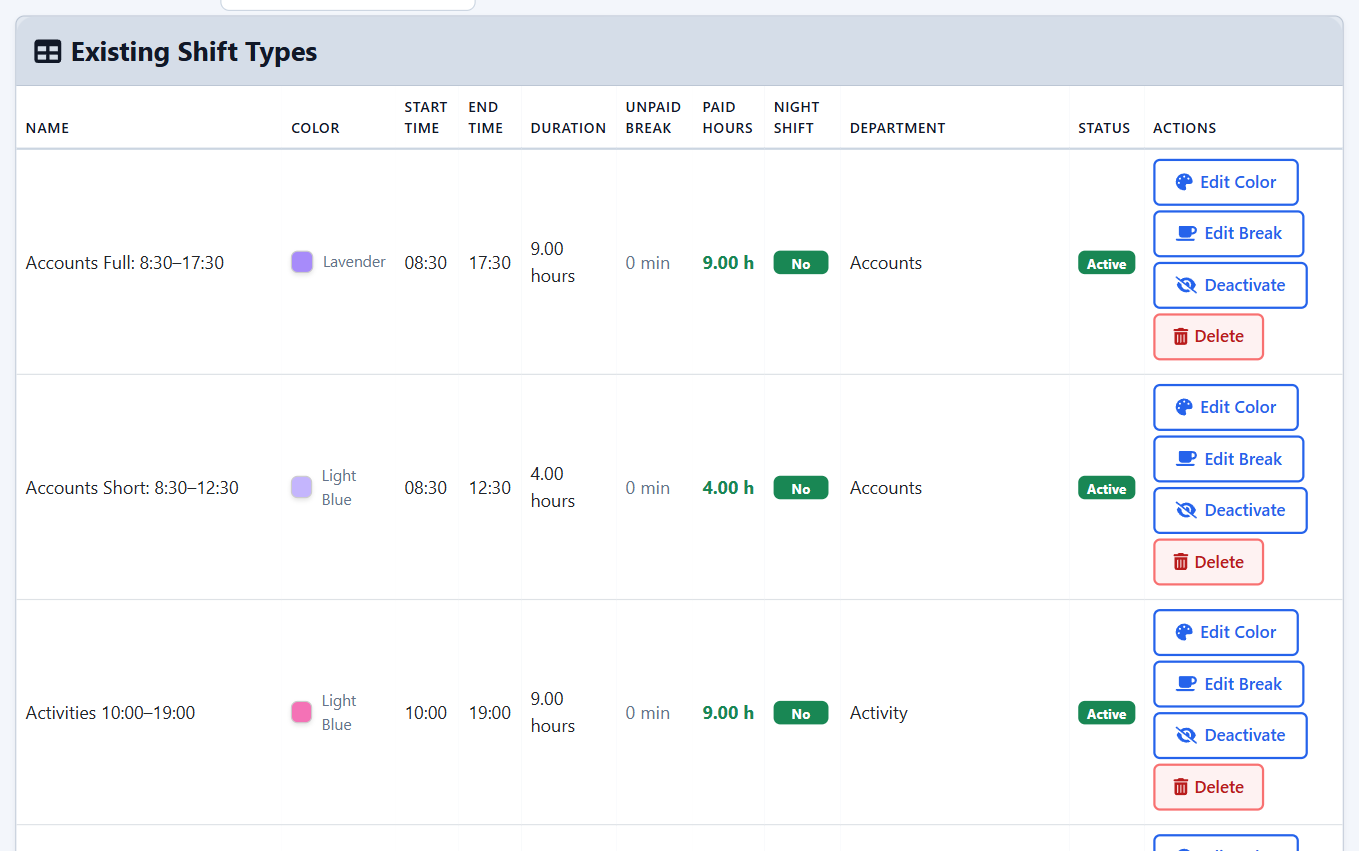
Plan the cover the home needs, then build and publish the week against it.

  • Shift requirements planning for a week, showing the required shifts and number of workers needed on each day
    Set the shifts and cover each day needs
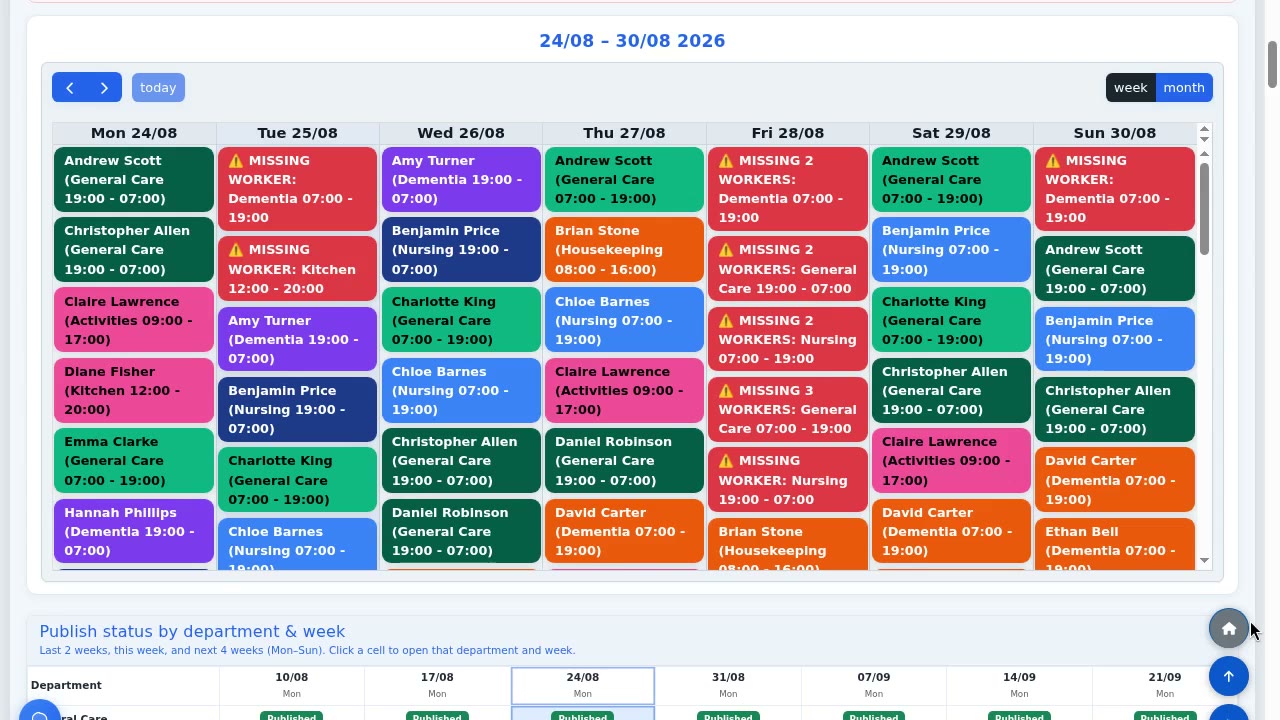
  • Weekly schedule showing assigned staff with shift times, and red alerts where a required shift still has no worker
    Build the week and see unfilled requirements
  • Shift types list with start and end times, duration, unpaid break, paid hours, night shift flag and department
    Shift types carry times, breaks and paid hours

Time, attendance and leave

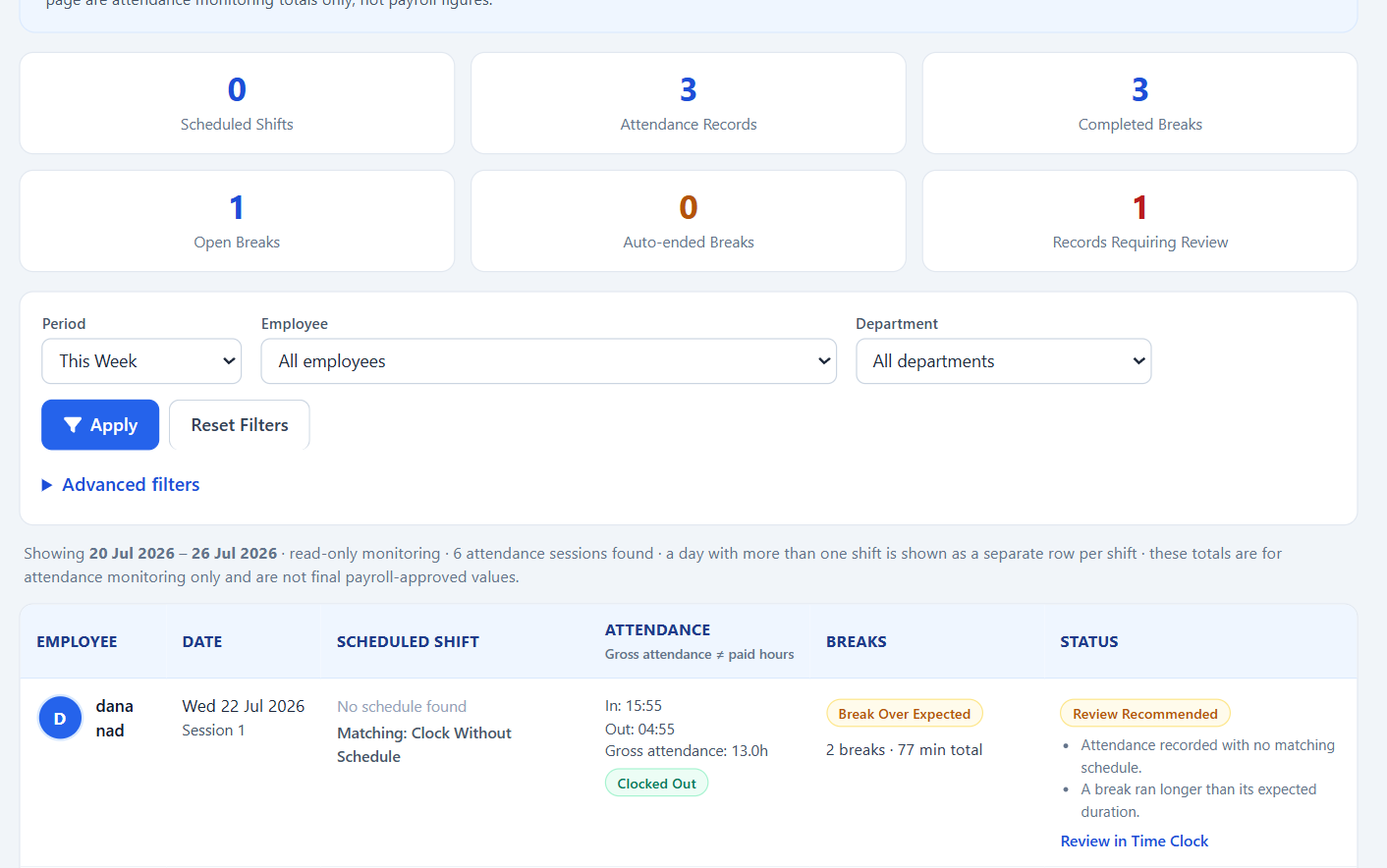
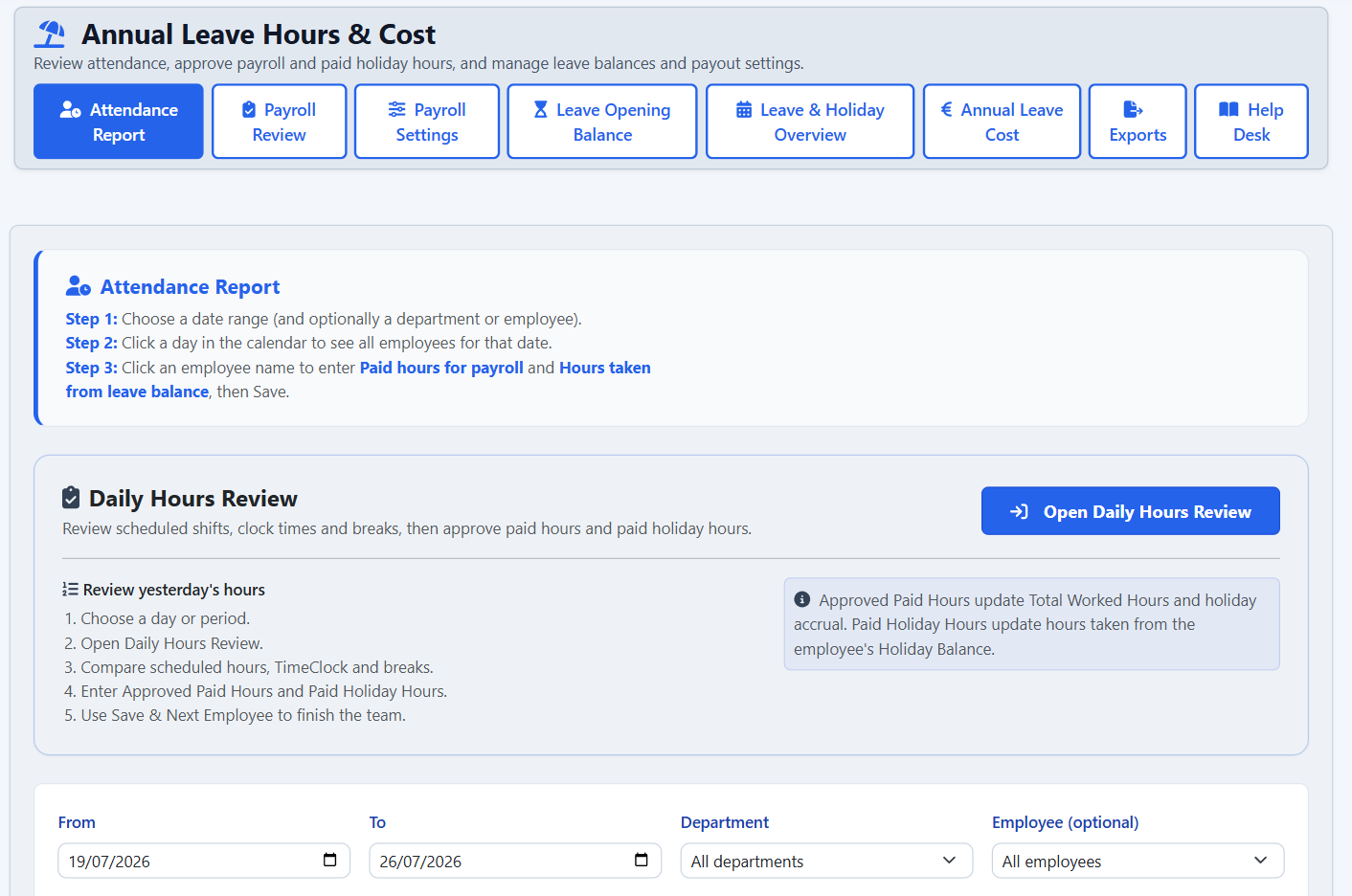
Attendance and breaks are recorded against the shift, then reviewed before payroll.

  • Attendance and break history showing clock-in and clock-out times, gross attendance, break totals and records that need review
    Attendance and breaks, with records flagged for review
  • Daily Hours Review workspace where a manager compares scheduled hours, clock times and breaks before approving paid hours
    Approve worked hours before payroll review
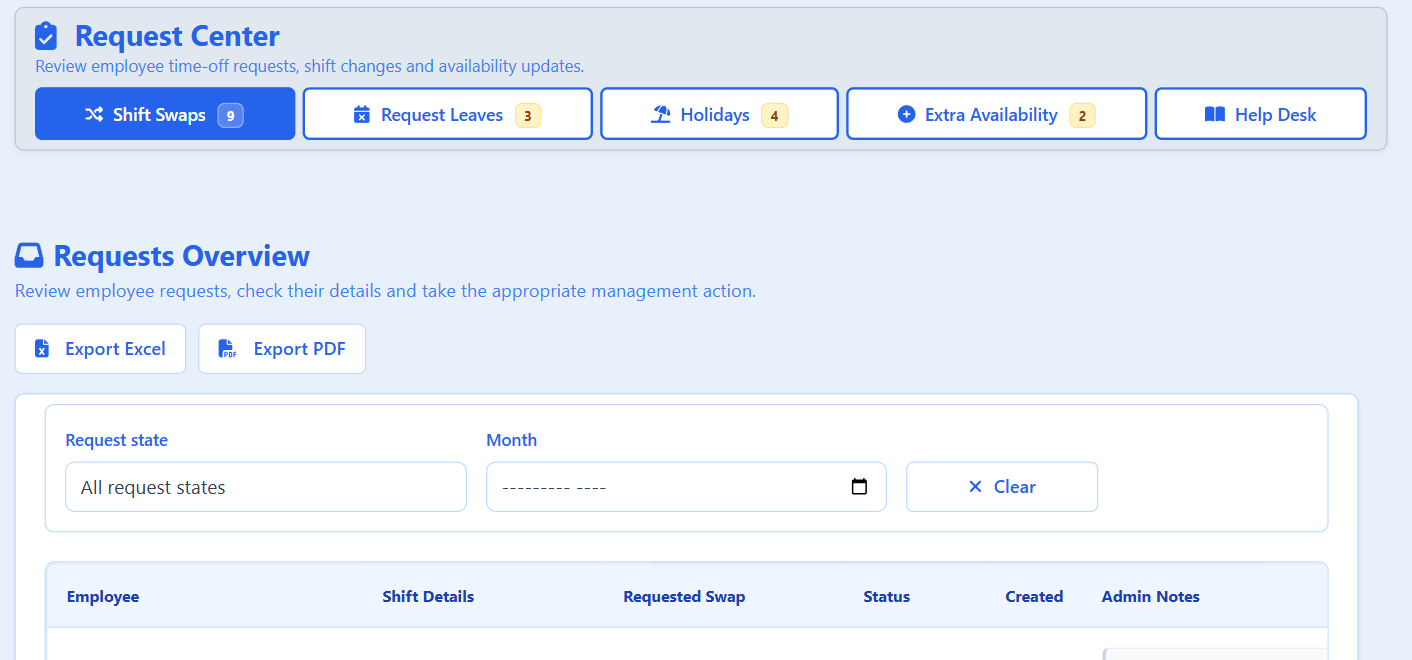
  • Request Centre showing counts of shift swaps, leave requests, holidays and extra availability waiting for a decision
    Swaps, leave and availability in one queue

Everyday outcomes

Give your team time back every week

ÁitFoirne reduces repeated data entry, paperwork and switching between disconnected systems.

Less repeated admin

Connected records

Rota, clocking, approved hours, leave and employee records remain connected instead of being entered into several systems.

Fewer routine follow-ups

Employee self-service

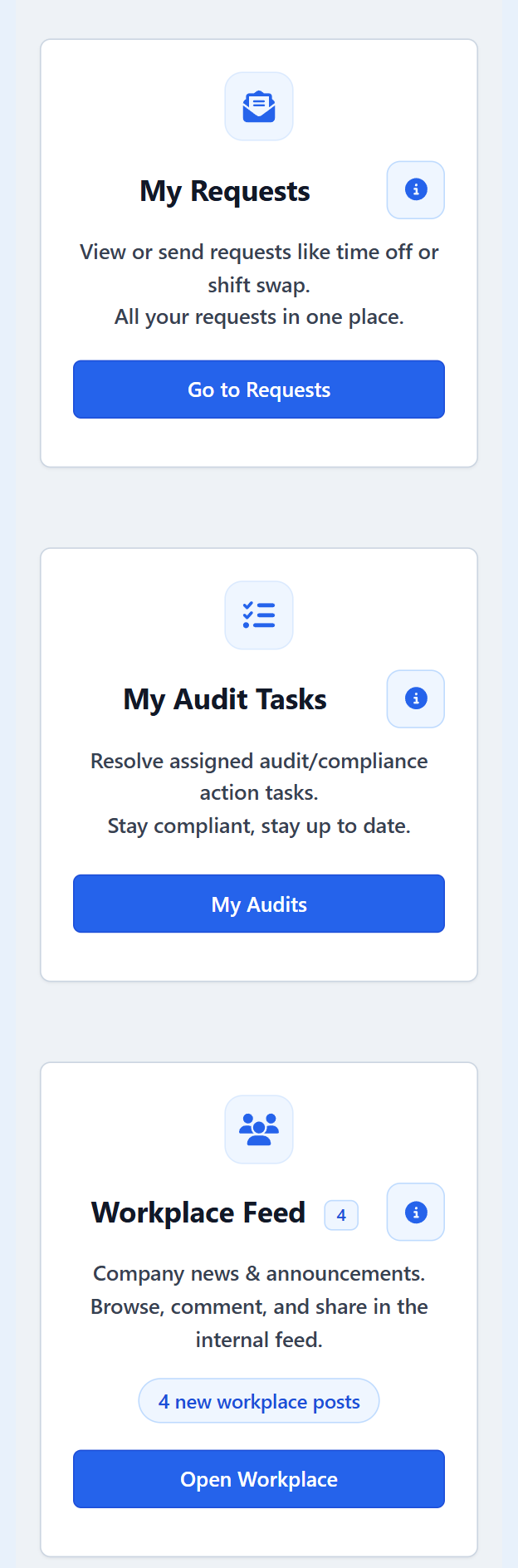
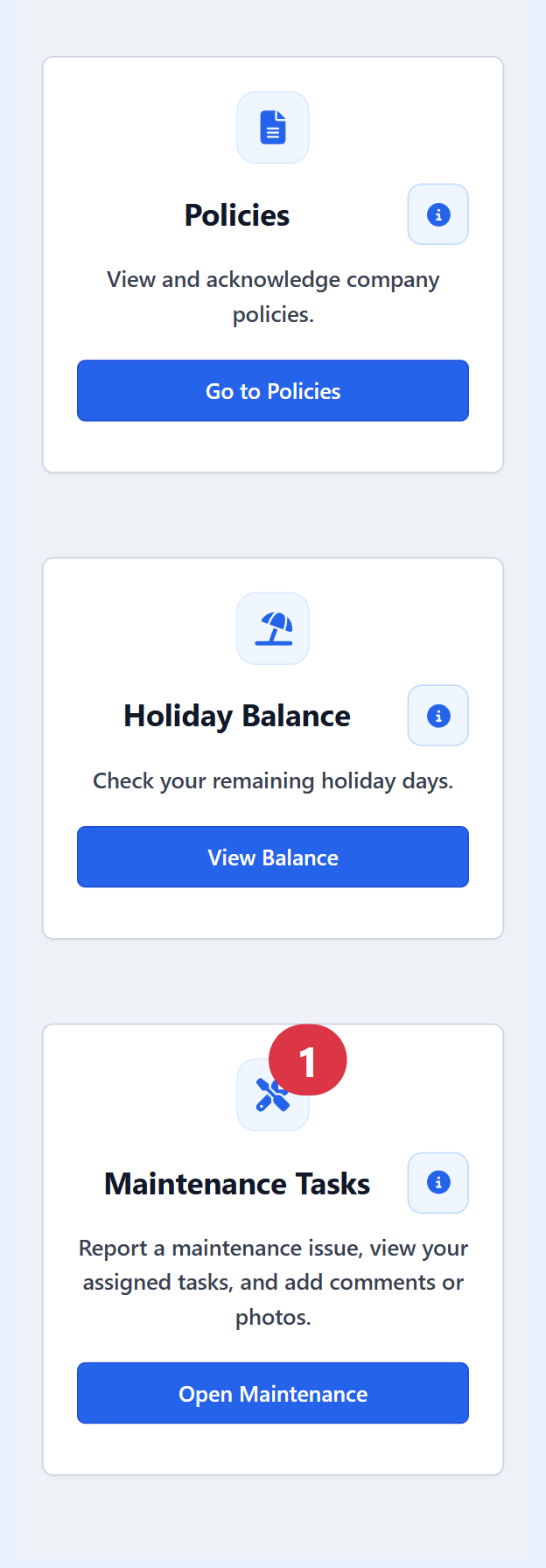
Employees can check shifts, requests, holiday balances, policies and assigned tasks through their own portal.

Faster access to records

Evidence close to hand

Managers can retrieve attendance, audit, policy and operational evidence without searching through separate folders and spreadsheets.

Employee Portal

Simple enough that your staff will actually use it

Care staff open one phone-friendly portal instead of ringing the office. Everything they need is grouped into a few clear areas.

My working day

Published shifts, current clock-in status, clocking in and out where permitted, and break status.

My requests

Annual leave requests, shift change requests and holiday balances in one place.

My documents and policies

Read and acknowledge policies, and keep the acknowledgement recorded as evidence.

Messages and updates

Internal messages, workplace updates and staff surveys, without a separate app.

My assigned tasks

Assigned audit tasks and maintenance work, visible to the people responsible for them.

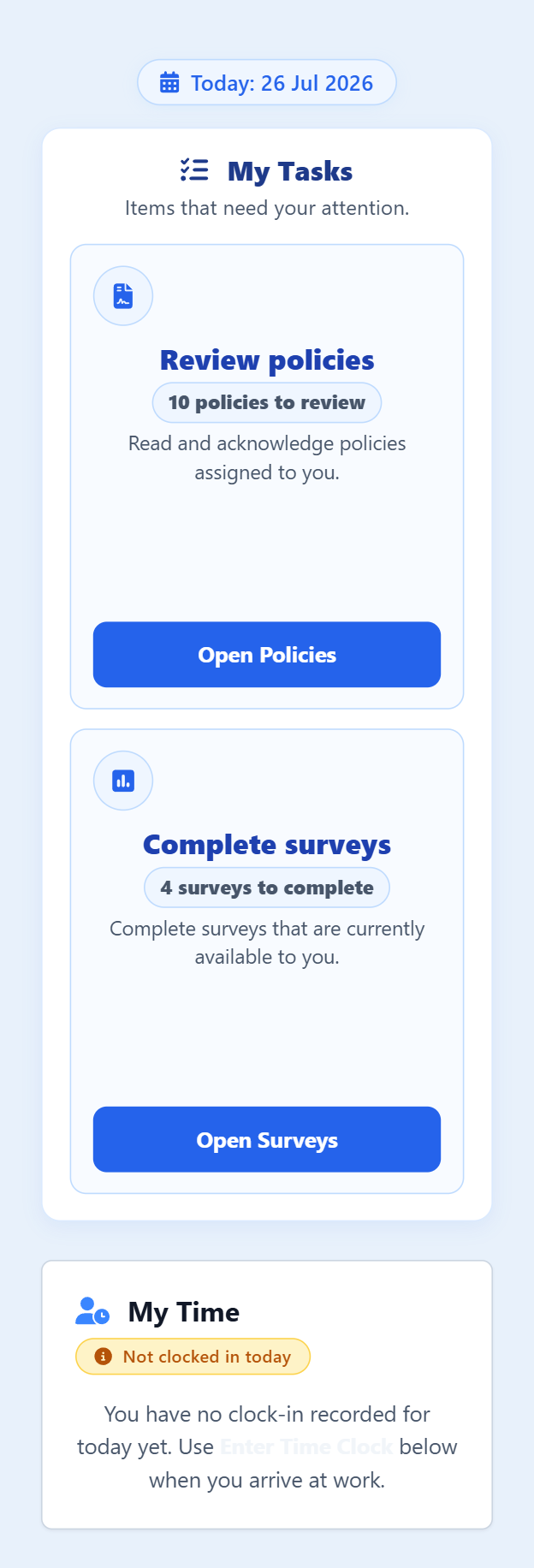
  • Employee Portal overview showing My Tasks and current time status
    My working day
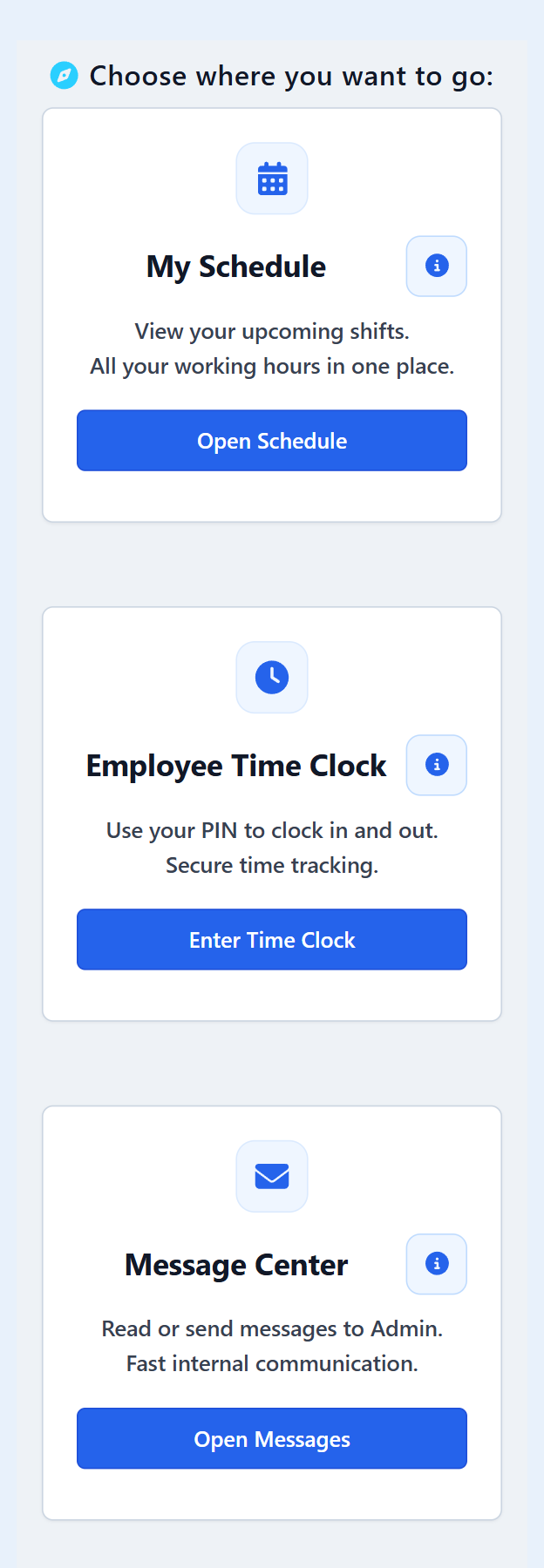
  • Employee Portal showing updates, schedule, time clock and messages
    Updates and core tools
  • Employee Portal showing surveys, requests, audit tasks and Workplace Feed
    Requests and assigned tasks
  • Employee Portal showing breaks, policies, holiday balance and maintenance tasks
    Policies, leave and maintenance

Bruno — built-in admin assistant

Ask Bruno for a quick answer without searching through several screens

Bruno is a read-only assistant for administrators. It answers from information already in your system and explains how a section works — it never changes records, approves requests or publishes schedules.

Available to authorised administrators where enabled.

Bruno Admin assistant · read-only

Example questions administrators can ask:

How many employees are clocked in right now? Who has not clocked in but is scheduled today? Are all employee requests approved for this week? Who is on holiday today? Up to which date is the schedule published?

Example questions. Bruno answers from your own data and product guidance.

Communication and operations

More than staffing records

These tools sit alongside the staffing features, so everyday updates and issues do not get lost in personal messages and paper notes.

Workplace Feed

A familiar internal workplace feed for staff updates and announcements across the home.

Message Center

Direct internal communication between managers and staff, kept inside the system.

Maintenance

Report nursing-home maintenance issues, assign them, and track progress to completion.

Support Desk and surveys

Raise application or support issues, and gather staff feedback through surveys.

People and operations

HR records, staff feedback and internal updates sit beside the staffing tools.

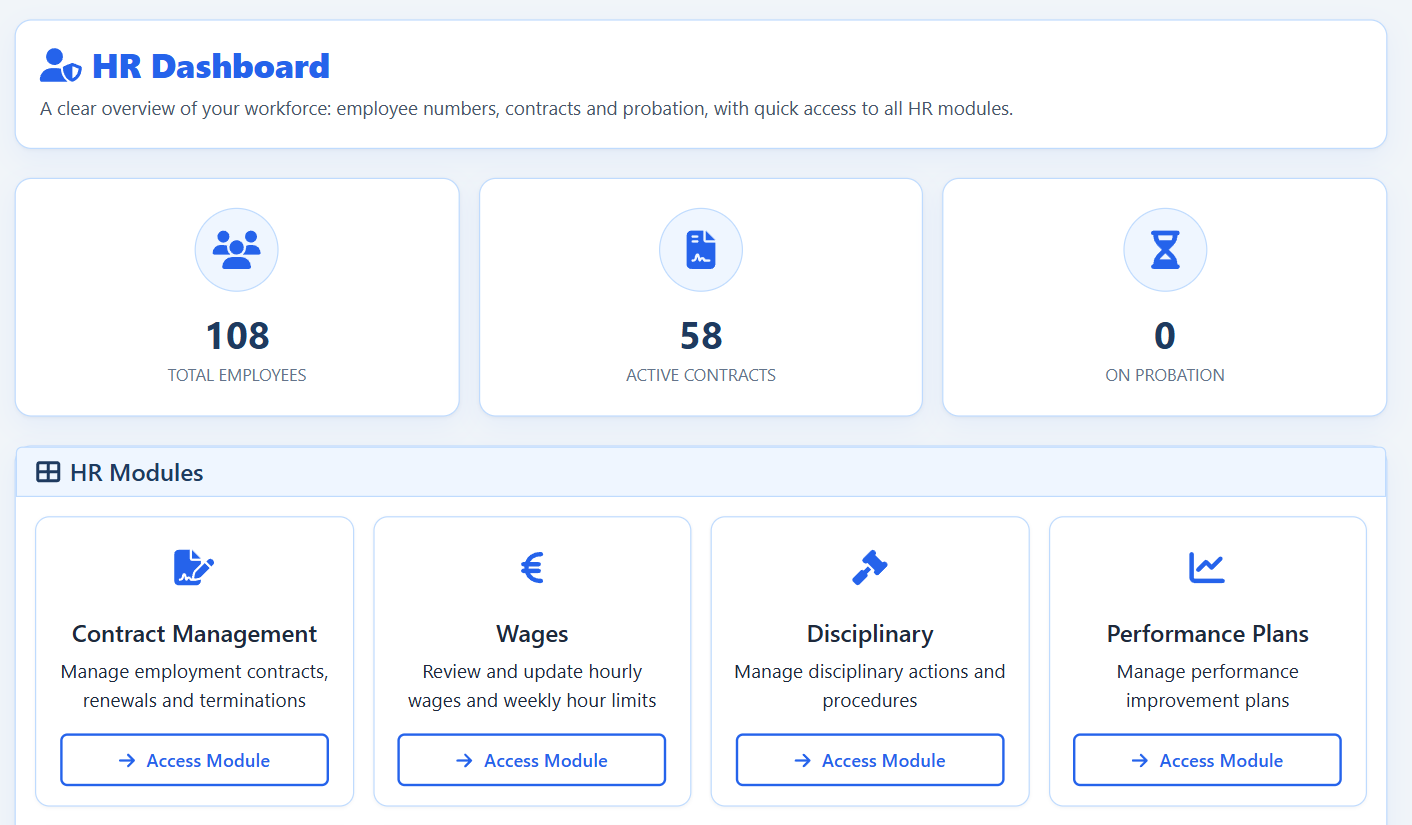
  • HR dashboard showing employee, contract and probation counts with quick access to HR modules
    HR overview and modules
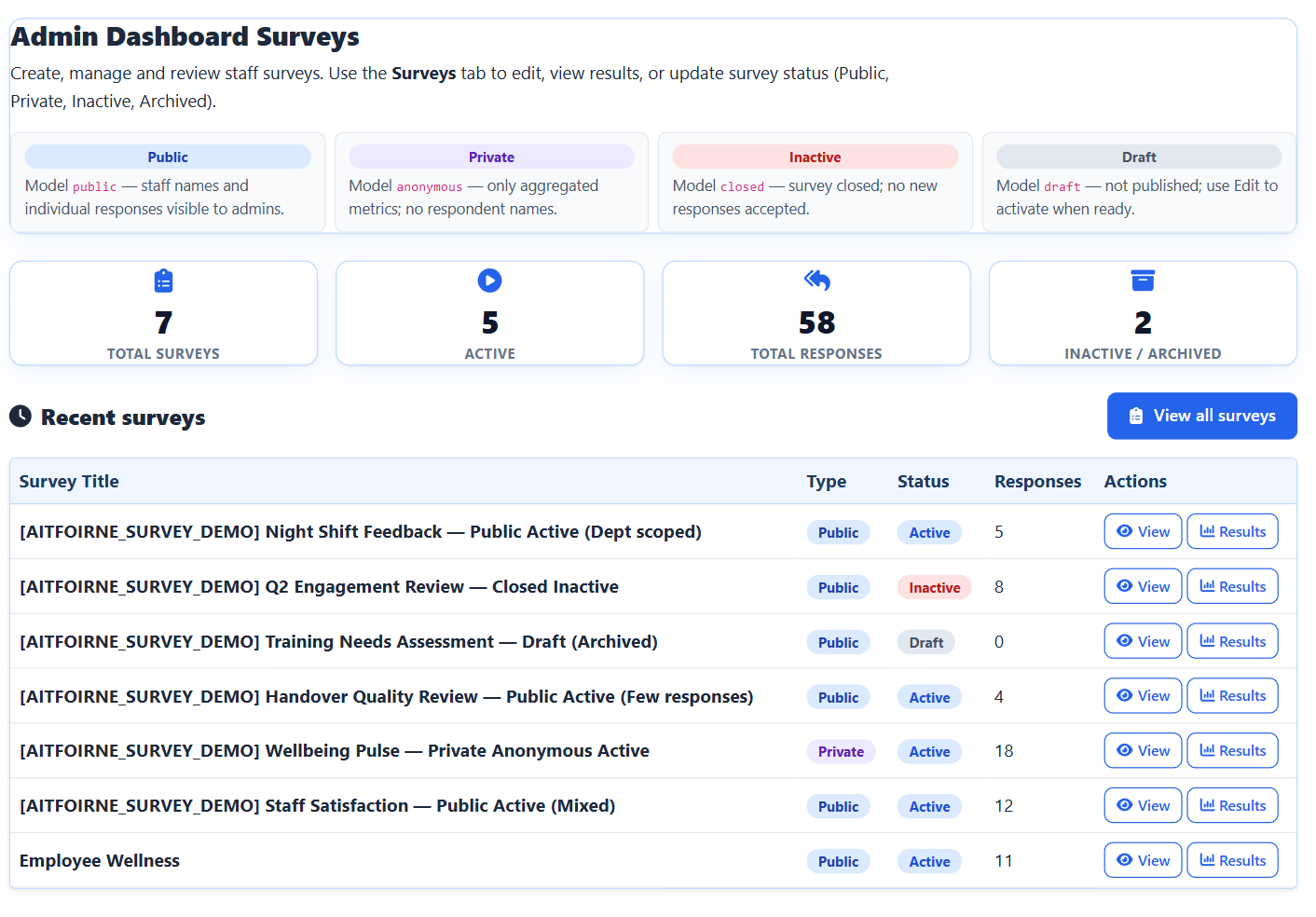
  • Survey management dashboard listing staff surveys with type, status and response counts
    Staff surveys and responses
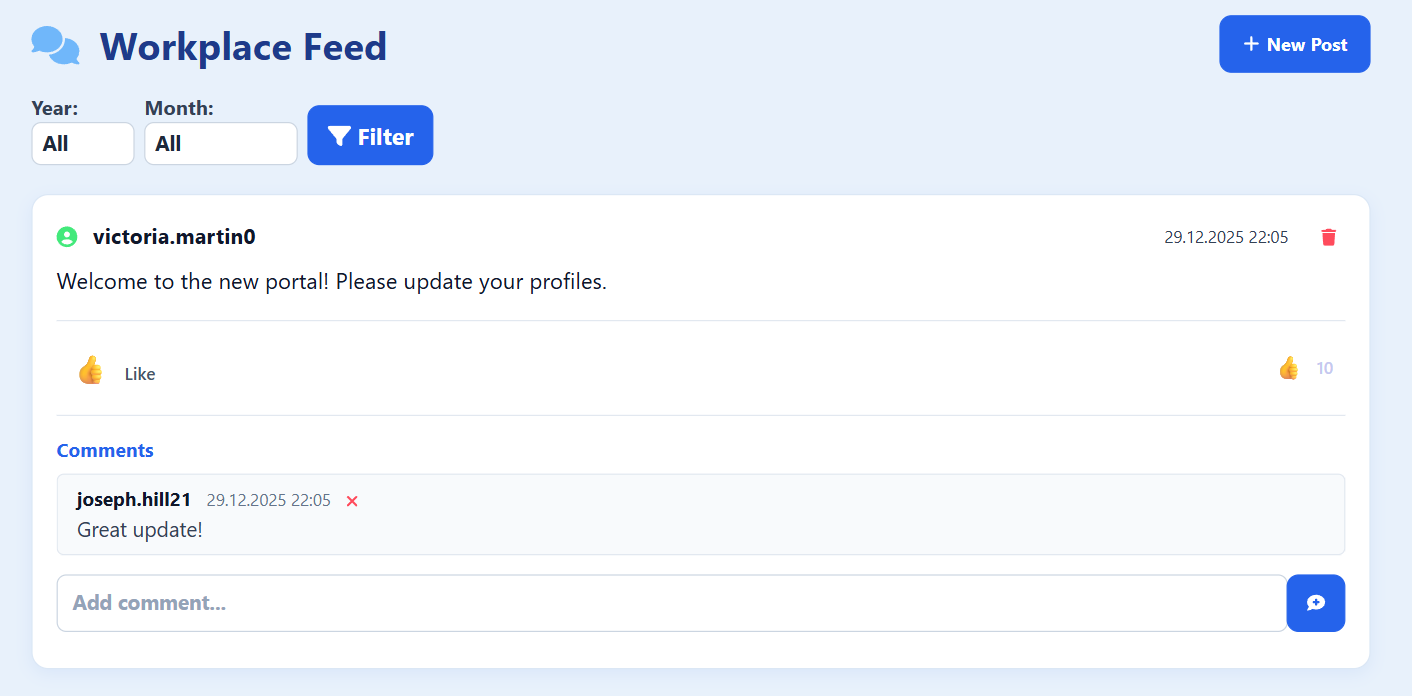
  • Workplace Feed post with reactions and a comment from a colleague
    Workplace Feed for internal updates

Guidance where the work happens. Guidance is available inside key areas of the application, helping users understand what to do without leaving their workflow. Access to each section follows the permissions you set for that person.

Compliance and evidence

Keep inspection evidence organised and easier to retrieve

ÁitFoirne helps homes gather the day-to-day records inspectors and managers ask for — without promising certification or guaranteed inspection outcomes.

Assign audits

Send checklist-based audits to named staff and track completion.

Action plans from failed checks

When a mandatory check fails, follow-up actions can be recorded and reviewed.

Policy acknowledgements

Staff read policies and acknowledge them, creating a clear record for the home.

Certificates, training and exports

Track credentials and export evidence when managers or inspectors need it.

Policies, audits and guidance

Policies, acknowledgement rates, audits and in-app guidance live in the same system.

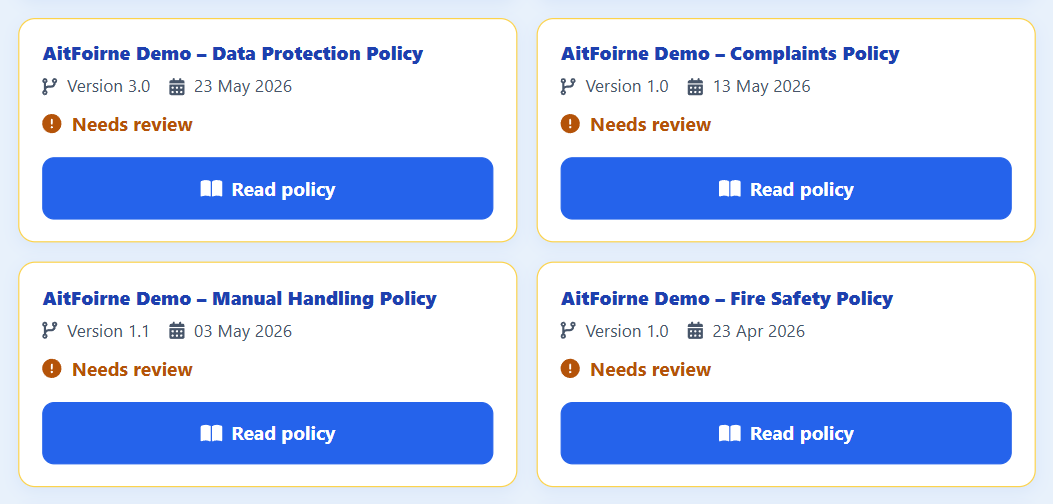
  • Company policies list with versions and publication dates for policies such as data protection, manual handling, fire safety and complaints
    Policies staff read and acknowledge
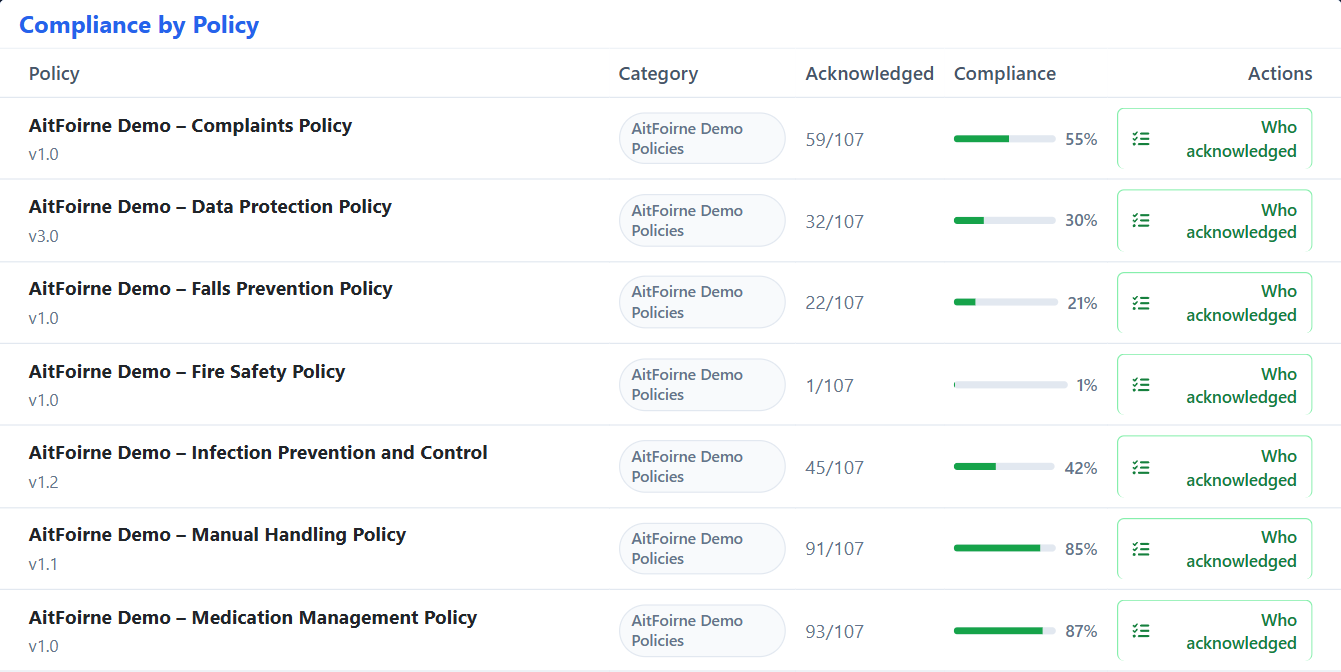
  • Compliance by policy table showing how many active employees have acknowledged each policy and the percentage complete
    Acknowledgement rate for every active policy
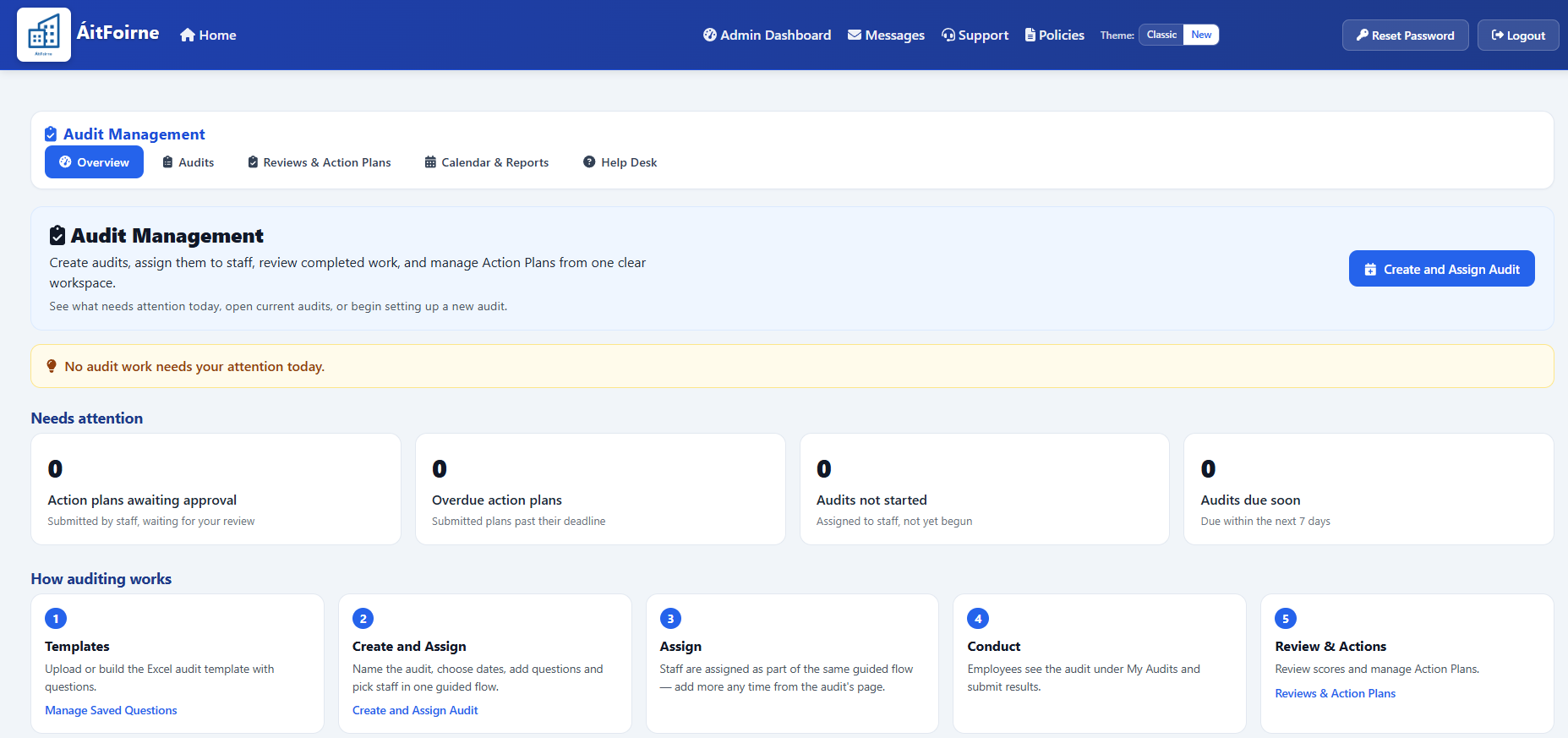
  • Audit management overview showing items needing attention and the five steps of the auditing process
    Create, assign and review audits and action plans
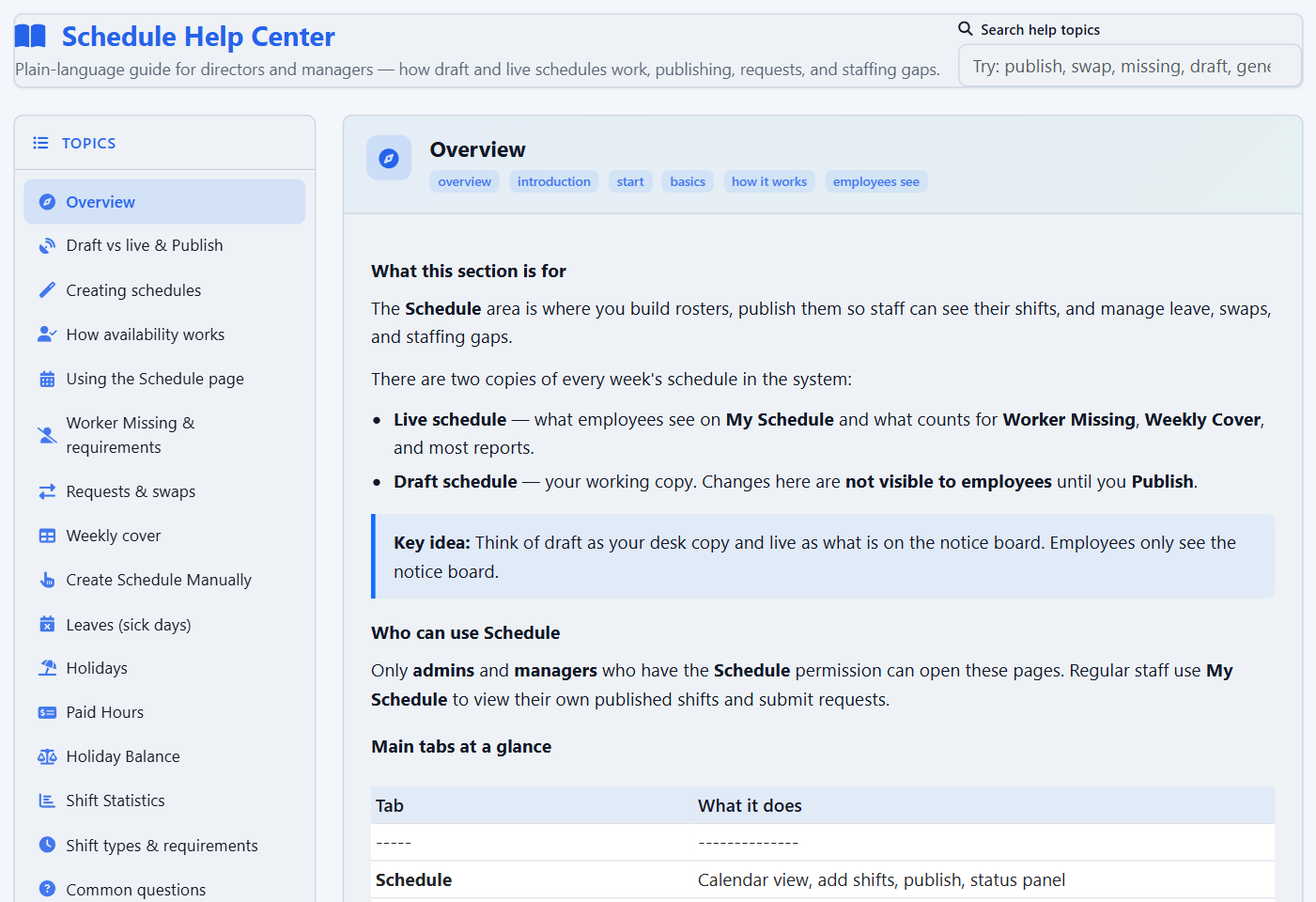
  • Schedule Help Center inside the application, with a topic list and a plain-language explanation of draft and live schedules
    Guidance inside the section being used

Shaped by the workplace

Built with nursing-home teams, not in isolation

ÁitFoirne is shaped by the people who use it during a real nursing-home working day — from Directors of Nursing and administrators to frontline employees using the Employee Portal.

A platform that keeps improving

Improvements follow real use, practical questions and changing operational needs in Irish nursing homes.

  • Designed around real workflows

    Features follow how teams prepare rotas, approve hours, manage leave, track policies and organise evidence.

  • Support where the work happens

    Direct practical support and on-site understanding help identify what users need while they work.

  • Continuously improved

    The platform is refined as nursing-home teams use it and provide feedback.

Simple published prices

One platform. Clear published prices. Nothing extra.

ÁitFoirne is the all-in-one workforce system — rota, time, leave, HR, policies, audits and the Employee Portal. Clinical and Family Portal are optional. Groups with several homes get one invoice and a published volume price. The first month is free. There is no setup fee and no contract. Cancel any time.

Resident care

Clinical

€99 per month, up to 50 residents

51–100 residents €149 / month. 101+ residents €199 / month.

Daily Care, Today’s Care, assessments, care plans and incidents. Medicines stay outside this product.

  • Care Portal for Nurses and Healthcare Assistants
  • Today’s Care and the resident day timeline
  • Inspection-supporting Excel exports for your own files

Family connection

Family Portal

€49 per month, up to 50 residents

51–100 residents €79 / month. 101+ residents €99 / month.

A private link and PIN for authorised relatives. Families do not pay.

  • Messages and up to five photos
  • Care-home posts for one resident
  • In-app Family Activity only — no email or text fees

Irish care groups

5 homes or more

20% off the published prices above

For a group that runs several homes — including groups of around ten. Same products. One invoice. Each home keeps its own staff, Clinical and Family records.

  • 20% off ÁitFoirne, Clinical and Family Portal
  • Go live home by home, first month free on each home
  • Cancel any home any time — no group lock-in
  • One group contact and one monthly invoice

Homes often pay more, and per module. This is all-in-one, with the price on the page. First month free on every product. No setup fee. No long-term contract. Cancel any time.

Ready to see ÁitFoirne in your home?

Book a short online walk-through tailored to how your nursing home runs today.

Book a Demo

Book a demo

Tell us about your home

Share a few details and we will arrange a short online walk-through tailored to your rota, attendance and office workflows.

Back to top